YouTube can teach you to sharpen a knife, rewire a lamp, or play your first song on a guitar, and it will absolutely not stop you from spending the whole evening watching other people do those things instead. The difference between walking away with the skill and walking away with three hours of watch history comes down to a handful of small habits, set up before you ever open the app.
A couple of winters ago I set out to learn basic video editing from YouTube, and by 11 PM I had watched eleven videos about editing and edited zero seconds of footage. Along the way I also absorbed a documentary about how movie sound is made, a frame-by-frame breakdown of a fight scene from a film I don’t even like, and something involving a restored 1970s arcade cabinet. All of them were good videos, and none of them was what I had sat down to do.
You probably have a version of this story somewhere: the guitarist who watches fingerstyle covers for three hours without ever tuning his own guitar, or the home cook scrolling knife reviews at midnight over a container of takeout. The knowledge on YouTube is real, it’s free, and a lot of it is explained better than anything I heard in the lecture halls I paid to sit in. The problem was never the content. It’s that YouTube is a classroom built inside an amusement park, and the exits are hard to spot from inside the rides.
The fix, after a lot of failed evenings on my end, has nothing to do with willpower and everything to do with structure. A handful of small habits, arranged before you open the app, are what usually separate people who learn from YouTube from people who simply watch it. Nothing here is complicated, most of it takes about five minutes to set up, and in my experience it quietly changes what the platform is for.
In this article
YouTube Is a Great Teacher and a Terrible Classroom
It helps to look plainly at what the platform is built to optimize, because that one fact explains nearly everything that goes wrong. YouTube’s recommendation system runs on watch time. More than two billion logged-in people visit every month, and longer sessions mean more ads, so every element of the watch page, the autoplay toggle, the sidebar of “up next,” the end-screen thumbnails, exists to keep another video rolling. The company’s own help pages on autoplay describe the feature as a way to keep related videos playing without you lifting a finger, which is precisely the trouble when the video that keeps playing wasn’t one you chose. Nothing sneaky about any of it; the incentives are published.
None of this makes YouTube evil. It makes it a business, and businesses tend to follow their incentives. The same incentive even shapes how videos get made, since creators figured out long ago that videos over eight minutes can carry multiple mid-roll ad breaks, which is part of why a two-minute answer so often arrives inside a twelve-minute video. The default settings are tuned for an audience YouTube wants, a long-staying one, and that audience is usually not you on a Tuesday night trying to figure out regrouting.
The learning itself, once you actually reach it, tends to be good. You can pause a master woodworker mid-cut and replay his chisel angle twenty times over. You can set a drum lesson to half speed (the player offers 0.25x through 2x) and study the stick grip frame by frame. That’s instruction aimed at your exact confusion, available at 10 PM, for free. For hands-on skills I’d take a strong YouTube channel over a community college intro course, mostly because you can re-watch the hard part as many times as you need, which is more patience than any professor I had ever offered.
Restructuring the environment so the learning part wins is the whole game, and everything below serves that one goal.
Start With the Project, Not the Search Bar
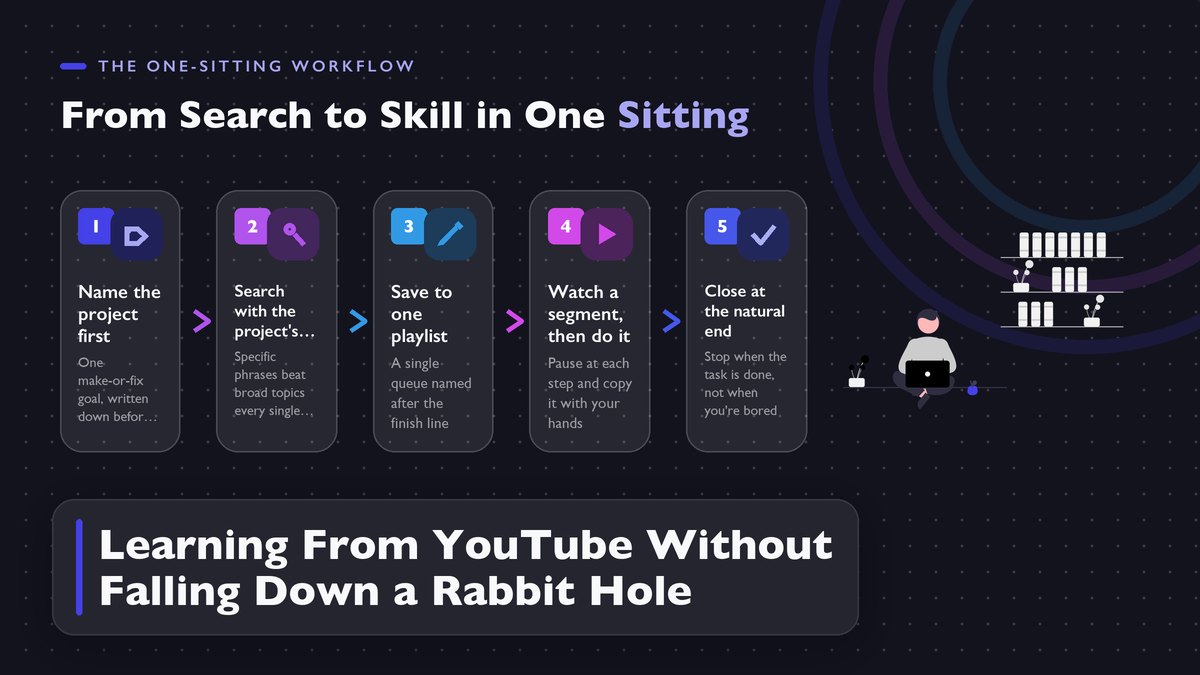
The single biggest upgrade is deciding what you’re looking for before you type a single word, because vague goals produce vague sessions. “Learn some Spanish” usually dissolves into polyglot vlogs within twenty minutes. “Learn to order food in Spanish” gives every later decision, from which playlist you open to the moment you call the session done, something concrete and checkable to push against. Same language, totally different evening.
So begin with a project, stated in one sentence, with a visible end. Bake a sourdough loaf that actually rises. Swap the faucet washer that’s been dripping in your kitchen since March. Play the opening of “Hotel California” slowly, without stopping. The sentence should point at a thing you’ll be able to see and touch. When I finally did learn video editing, the project that worked was almost comically small: a ninety-second montage of a family weekend. Small is not a failure here, because that tiny target is the only reason the rest of this system had something to grip.
Write that sentence on whatever is within arm’s reach before you open the app, whether that’s a paper notebook, the notes app, or a sticky note on the monitor, since the medium barely matters and the writing does. A written goal survives the moment a tempting thumbnail appears, while a mental one tends to evaporate on contact.
Then build one playlist named after the project, and only one. YouTube’s playlist tools are better than most people realize: on the watch page you hit More, then Save, then “Create new playlist,” and from that point the playlist panel plays only what you put in it, in an order you can drag into shape. Name it after the finish line (“Sourdough, one loaf”) rather than the topic (“baking”), because a name with an ending keeps reminding you what the queue is for. Every video you find goes into that playlist before anything gets watched. This habit deletes most of the rabbit hole, since the hole has always depended on you never quite deciding what to watch next.
The Two Kinds of Watching
There are two quite different things we do on YouTube, and almost all the frustration in this corner of the internet comes from doing one of them while expecting the results of the other. Watching for pleasure is fine. I do plenty of it, and nothing in this article is a case against it. But the two modes need different setups, and confusing them is how an evening of “learning” ends with nothing but crumbs on the keyboard.
| Watching for entertainment | Watching to learn | |
|---|---|---|
| Goal | Pass time enjoyably | Produce something or gain a repeatable ability |
| What “done” looks like | You feel like stopping | You can do a thing you couldn’t do before |
| Recommendations are… | The whole point | A hazard to route around |
| Session shape | Open-ended, wandering | Bounded, one playlist, one sitting, one exit |
| Notes | None | A running note open the whole time |
| Ending | Whenever | When the step is done, at a planned stopping point |
Decide which evening you’re having before you open the app: if it’s a learning night, start from the playlist with autoplay off, and if it’s an entertainment night, at least do yourself the one courtesy of switching autoplay off so the session ends when you stop choosing it rather than four videos after. I’d argue the entertainment evening is the more dangerous one to drift into, since it disguises itself as the other right up until bedtime, when the lights go off and the scoreboard reads three hours watched, zero skills gained. In learning mode, the table above doubles as your setup checklist (one playlist, one note, one planned exit), and trying to run both modes in a single sitting is where most evenings go sideways.
Switch Off the Machinery Built to Hold You
Learning mode gets much easier once the watch page shrinks to just the video you came for, with nothing else on the screen competing for your attention. The whole setup takes about three minutes, and it only needs doing once.
Start by turning autoplay off on every device you own. In a browser the toggle sits at the bottom of the player on the watch page itself; in the phone app it’s under Settings, then Autoplay; on a smart TV you open the YouTube app, go to Settings, and scroll to Autoplay. The setting is oddly easy to miss, which makes sense once you remember the business model depends on the next video starting before you’ve decided anything. With it off, a video ends and the page just waits, and that pause is your opening to ask whether whatever comes next was your idea or theirs. One small mercy, straight from YouTube’s own help pages: on mobile data, autoplay stops by itself after 30 minutes of inactivity, and accounts belonging to 13-to-17-year-olds get it switched off by default.
The Library tab is the side entrance worth using, because the Home feed is the algorithm’s territory, reshuffled constantly to hold your attention, and you don’t need it for learning anything. Open the app straight into your playlist from there, or search for your exact project’s words. If a television is where you watch, the trap gets worse: lean-back posture, remote in hand, the next video already playing before you’ve formed an opinion. Queue the playlist on your phone first and cast it, because casting hands you the autoplay switch on the phone’s control bar, so the big screen shows your list rather than the recommendation wall.
Friction is your friend in all of this, because every extra step between you and the next suggested video is a step you get to take on purpose.
One more tool for the looser sessions, the ones without a concrete task like researching which soldering iron to buy, is a plain timer: set fifteen or twenty minutes on your phone’s clock app before you start. It feels almost childishly simple, and it works anyway. The same scheduling discipline at the scale of a whole week is the subject of our guide to planning your week in fifteen minutes.
A rabbit hole is not a character flaw. It’s a feature, built by professionals, aimed at everyone equally.
The Rabbit Hole Has an Anatomy
Something that helped me more than I expected was mapping out, step by step, how a rabbit hole actually happens. The pattern barely varies once you write it down, and once you can see it, the whole thing becomes strangely easy to catch in the act.
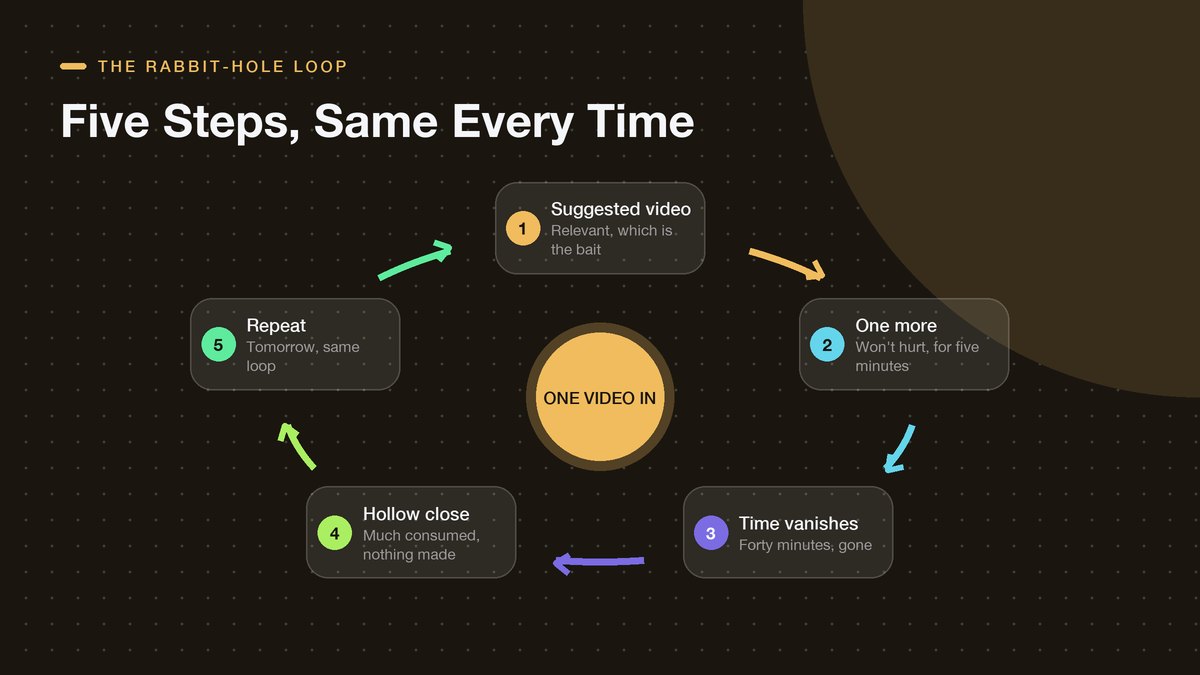
Every step in that loop feels reasonable on its own. The suggested video usually is relevant, which is the whole reason the algorithm floats it to the top of your sidebar. “One more” truly won’t hurt anything inside the next five minutes. The bill only arrives at the end of the loop, in that flat feeling of having consumed a great deal and produced nothing, and by then the machinery has you queued up for tomorrow’s round.
None of it is accidental. Every step is designed, and that fact is your opening. You don’t have to win some endless war against your own attention; you only have to break the loop once, usually in under 10 seconds. The instant you catch yourself watching something that never made it into your queue, do the boring small thing and close the tab (not the whole app, necessarily, just the tab with the off-plan video in it). Then either reopen your playlist and continue with the plan, or accept that today’s learning session is over and go do the part of the project that doesn’t involve a screen at all. Either outcome beats the loop running four more laps.
Judge Channels, Not Individual Videos
Tutorial channels are not all built alike, and choosing the right teacher saves more grief than any setting ever will. One viral video proves nothing; it might be the only decent thing the person ever filmed. What you want is a channel that teaches one thing, consistently, and in an order that builds.
When I size up a channel for a new skill, I run through a short list of signals, checking them across several videos rather than trusting a single hit.
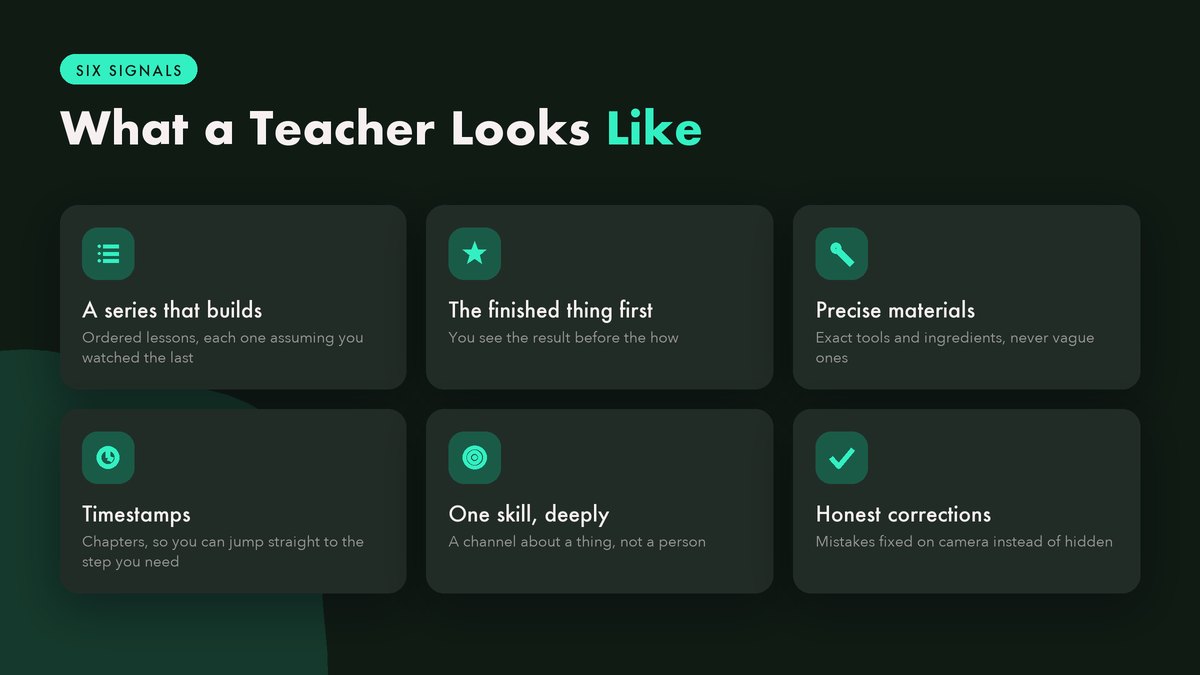
The finished-example signal earns its own paragraph because it predicts teacher quality better than anything else I’ve found. A channel that shows you the completed thing in the first thirty seconds (the loaf, the bookshelf, the played riff) and then works backward from it is teaching you. A channel that spends six minutes ramping about how exciting the project is before showing anything is usually monetizing your attention. Both can be enjoyable, but only one leaves you more capable than it found you.
A thirty-second scroll through the comments usually tells you plenty. On a good teaching channel you’ll often find earlier students answering newcomers’ questions or correcting small errors, which is a sign the lessons actually produced people who can do the thing. And glance at the upload dates on any series you plan to follow: skills tied to fast-moving tools go stale fast, and a 2018 playlist about software that’s had four major updates since will walk you through menus that no longer exist.
This is where sequenced alternatives earn their keep. MIT OpenCourseWare and Khan Academy both offer free, ordered courses that don’t age out (Khan Academy is the nonprofit Sal Khan started in 2008, and MIT has been publishing course materials free online since 2002), and they’re the better tool for theory-heavy subjects while YouTube handles the hands-on parts. My rule of thumb, probably wrong but useful, is to send the “why” questions to Khan and keep the “how” questions for YouTube.
The Ten-Minute Rule: Watch, Then Do
Of all the habits in this article, the one with the best ratio of effort to effect gets parked right here, in the middle, where the skimmers will trip over it. After any YouTube learning session, spend at least ten minutes doing the thing with the video closed. Not rewatching. Doing.
Watching manufactures an illusion of competence that’s nearly impossible to detect from the inside. You follow a baker through a loaf and every step makes sense, so your brain files the whole experience away under “learned.” Then you’re standing in your own kitchen, flour everywhere, unable to recall whether the salt goes in with the water or the dough. The distance between recognizing a step and reproducing it is enormous, and only doing closes it. Our twenty-minute practice guide builds its entire method around that gap, if you want the longer argument.
A productive session has a shape to it, and it goes roughly like this.
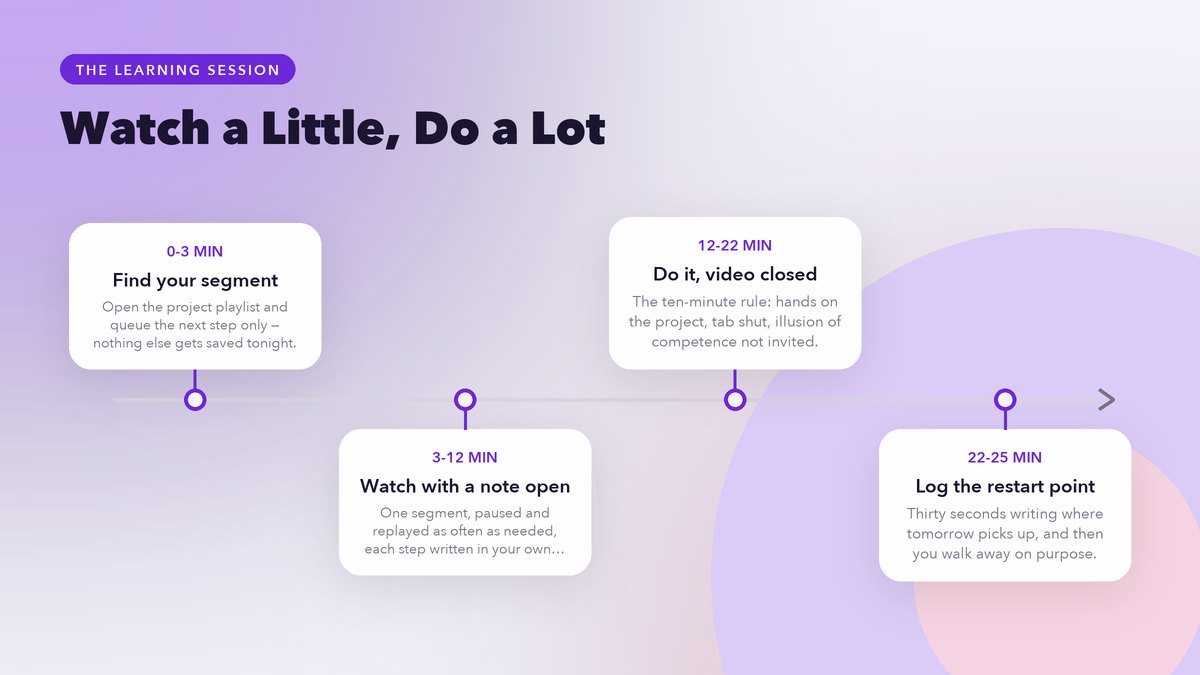
The note open beside the video does real work here. Not a transcript, not a highlight reel, but a running note where you write each step in your own words as you watch, confusion included. Jot down the oven temperatures, the app settings, the brand of flour, the chord shape, whatever the video glosses over because its creator has made four hundred loaves and you’ve made none. A confusion you wrote down is a confusion you can look up tomorrow.
If you want those doing blocks to compound across weeks, revisit them occasionally. Spaced repetition is the well-studied idea (Hermann Ebbinghaus plotted the forgetting curve back in 1885, and the principle hasn’t changed since) that skills and facts stick when you return to them just as you’re about to forget them, and you don’t need a special app for it. A calendar nudge every few days reading “knit three rows” or “play the riff five times” captures most of the benefit.
A Weekly Rhythm That Sticks
Stack the pieces together and a sustainable week looks something like this: two or three sessions working through one playlist for a current project, each ending with at least ten minutes of doing, plus one looser session for the fun stuff, clearly labeled as fun. Wandering gets its own window, and that window matters more than it appears. People who ban recreational YouTube outright tend to shatter the whole system inside a week, because an outright ban has no pressure valve. Giving the wandering its own hour or so, with autoplay off and a timer if you like, keeps it from leaking into the sessions meant for learning.
A single active project at a time is the one small rule that holds it all together. The playlist system makes it tempting to start queues for six skills at once, and then you’re collecting videos about learning instead of learning, so when the loaf is baked and photographed, the playlist moves to a “done” folder and only then does a new one open. (That done folder is also lovely to page through on a gray Sunday, for what it’s worth.) Finishing, even small things, is a skill in its own right; we treat it as exactly that in our piece on actually finishing what you start.
None of this demands monk-like discipline or a digital detox weekend. It’s a few decisions, made once, that let you use a magnificent library on your own terms.
External resources checked November 2026. Related reads on this site: free online resources that are actually worth your time and learning a language as an adult, where the same deliberate-practice principles apply.