A weekly plan doesn’t need a color-coded spreadsheet or a special notebook or a Sunday evening you dread. It needs fifteen quiet minutes and a short list you’ll actually look at again.
For years I planned my weeks the way I imagine air traffic controllers work, minus the training and the good equipment. Sunday night, laptop open, a fresh document titled something ambitious like “WEEK OF OCT 12 — GET IT DONE.” I’d block out the days: 7 AM gym, 8 AM deep work, a lunch walk, an evening side project. The document looked incredible. It held together until about 10:15 Monday morning, when one meeting ran long and the whole structure folded like a card house in a doorway draft.
Then came the move everyone makes. Abandon the plan, coast until Wednesday, feel guilty in a low-grade way, and open a fresh document the next Sunday, this one a little more elaborate than the last. The planning was never the issue, and the forty minutes a week wasn’t either. The problem sat somewhere else, and it took longer than it should have to find it, because every plan I built was designed for a fictional person living a fictional week, one with no interruptions, no flat Tuesdays, no errand that eats three times the time it should have taken.
Productivity circles love to speculate about how long the average person sticks with a planning system before dropping it, and nobody has ever counted this reliably, whatever the gurus imply. Watch any office for a month, though, and the abandoned systems pile up in plain sight: a fancy planner with two weeks filled in and the rest blank, a habit app with a 19-day streak that died in March, a whiteboard still saying “Q3 GOALS” in November. These systems didn’t fail because their owners were lazy, and they didn’t fail for lack of features either. They failed because they were engineered for a week that never occurs in nature, a week with no sick days, no traffic, and no Tuesday that simply goes wrong from the first alarm.
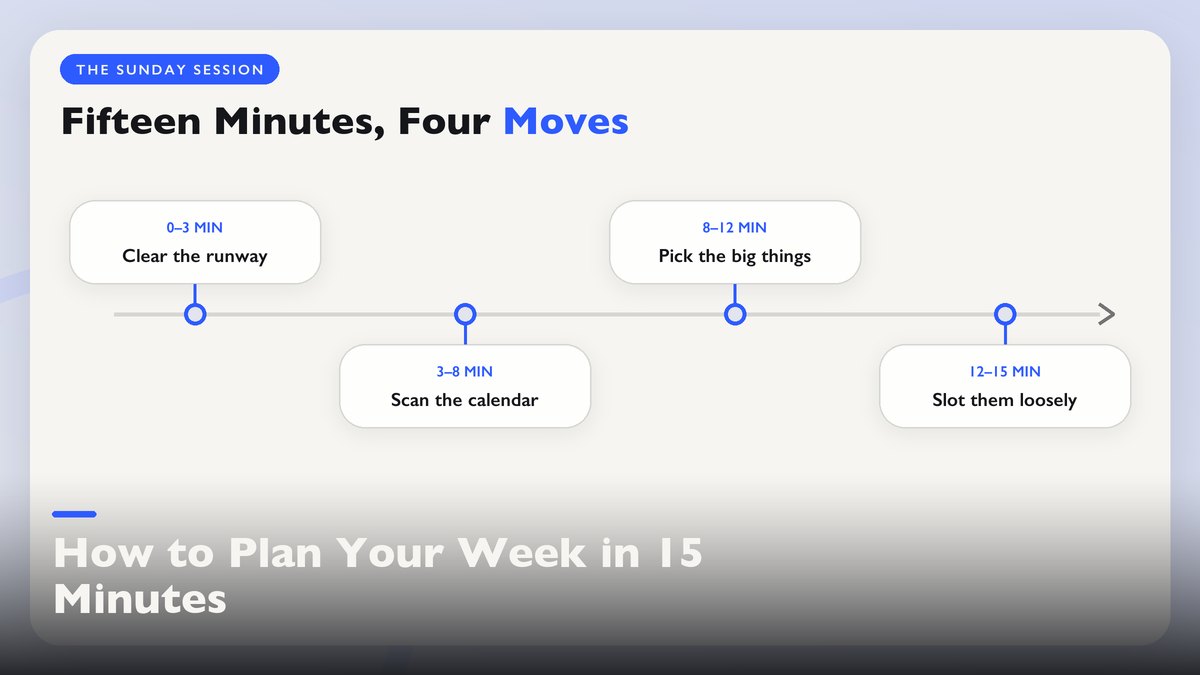
The version that finally stuck takes fifteen minutes, and I’ve run enough sessions to trust that number. Some counts say fourteen. I’ve never done it in under twelve, and I don’t trust anyone who claims five, because five minutes is barely long enough to find a pen. Fifteen is enough because you’re not designing the week; you’re deciding what matters in it, while being honest about how much of it you control at all, which by Wednesday is always less than Sunday-you believes.
In this article
Why Daily To-Do Lists Keep Losing
Daily lists collapse for a boring reason, which is that they start from empty. Each morning you wake up and ask what today should hold, with no memory of yesterday’s answer, no view of the week ahead, and a freshly caffeinated brain that runs permanently optimistic. Nine things go on the list and three get done, if that. The other six roll into tomorrow, which now holds twelve, and by Thursday you’re hauling a guilt pile of twenty items, half of which stopped being relevant sometime last week.
A weekly plan flips the order, because you decide once, from a little distance, what’s worth doing, and then each day you pick from decisions already made instead of making them fresh at 9 AM. Todoist’s guide to productivity methods makes the same point, and they’ve watched more people attempt planning systems than almost anyone, since the company has been selling to-do software since 2007. Their own methods library sells the Weekly Review as one hour a week that supposedly multiplies your productivity tenfold, which is the same claim in a louder jacket. You’ve felt the price yourself, because choosing what to work on at 9 AM under deadline pressure, with Slack pinging, costs far more than choosing on a calm Sunday with a cup of coffee.
The second failure mode is sneakier because it never looks like a failure: daily lists have no sense of proportion at all. A day can hold maybe three meaningful things, and life usually claims one of them in advance, the dentist, the school pickup, the favor you promised a friend. Plan day by day and you keep forgetting this, until the arithmetic ambushes you somewhere around Thursday afternoon. The weekly view drags the math out into the open: seven days, minus appointments, minus recovery time, leaves maybe ten to fifteen real slots for actual work, and that number stings a little the first time you write it down.
It stings because it’s information you didn’t have on Monday, when you were cheerfully signing up for nine tasks a day, at least if your Mondays look anything like mine.
You don’t plan the week to control it. You plan it so that when the week goes sideways, and it will, you know which parts you can drop without the whole thing falling down.
What You Need Before You Start
Two tools, and you probably own both already. First, one calendar you trust, and not three calendars synced together on hope. If appointments live in your head, on paper, and in a work calendar your phone can’t see, the fifteen minutes gets eaten just hunting for conflicts. Pick the calendar you’ll actually check daily, because Google keeps straightforward instructions for setting up and using Google Calendar, and if you live in Outlook, Microsoft publishes its own walkthrough for scheduling events. The brand barely matters, unless your workplace already chose one for you. Loyalty to a specific app is not a personality trait, whatever the internet claims.
Second, one list tool for the stuff that isn’t an appointment. “Buy light bulbs” doesn’t deserve a calendar slot, but it deserves to exist somewhere you’ll see it before the last bulb actually burns out. A notes app works fine for this, at least to start. If your calendar lives on an iPhone, Apple’s guide to using the Calendar app covers the basics well. Todoist’s help center is a decent starting point if you want a purpose-built app that has been around since 2007, and Notion’s documentation works if you prefer something more free-form from a company founded in 2013. In practice, the notes app that shipped with your phone is fine. I used a two-dollar paper notebook for the better part of a year and the system ran identically.
The tool is not the system, at least not the part that matters, and the two get confused often enough that it bears saying out loud.
One rule before the timer starts: from now on, everything goes in one of two buckets. Appointments, meaning things tied to a time and a place, go in the calendar; tasks, meaning things that just need to happen sometime, go on the list. Most planning misery I’ve seen comes from breaking this rule, usually by accident on a busy Thursday. Tasks on the calendar crowd out real appointments and manufacture days that look full but aren’t. Appointments on a list get forgotten, because a list has no sense of 3 PM Thursday. Keep the buckets separate and the whole setup stays simple enough to survive a bad month.
The 15-Minute Plan, Step by Step
Run the session at the same time every week, and mine is Sunday around 4 PM, when the weekend is winding down but evening hasn’t started. Some people prefer Friday before logging off, so Monday opens with the plan already waiting. The day matters less than the consistency does, and the consistency itself matters less than the productivity books claim, because what actually matters is doing the session before Monday’s chaos begins, whenever that is for you.
- 0–3 min — clear the runway. Start by looking at last week’s list, where anything crossed off gets deleted first, which feels trivial and is the most satisfying part of the whole session. Anything still open gets a quick verdict: still relevant this week, or drop it. Be brutal here, because that thing you’ve carried for three weeks and never touched is telling you something, and it isn’t “try again in April.”
- 3–8 min — scan the calendar. Check every appointment already on the books, from work meetings to the birthday dinner Saturday. Count the uncommitted hours actually left rather than the waking hours. The usable ones, after commuting, cooking, and the ordinary drift of life. For a typical work week this lands around twenty to twenty-five hours for most people I know. Your number will differ, so write it down.
- 8–12 min — pick the big things. From your task list, choose the small number of things that would make this week feel like a win. Not everything on the list, because the list is a menu and not a contract. I aim for three to five, and on a week with two evening commitments already booked it drops to two, which sounds low until you run the math in the next section.
- 12–15 min — slot them loosely. Give each big thing a rough home: Tuesday morning, Thursday after work, the weekend’s first half. Don’t schedule to the hour, since hour-level scheduling is where plans go to die, because one delay cascades through the entire day. Morning, afternoon, evening is enough granularity for anything that isn’t a meeting.
That’s the entire ceremony, just the timer off, the laptop closed, and Sunday resumed. The first few runs will feel rushed, like you’ve forgotten something, and you have. You’ve forgotten to overplan, which is the habit that killed the old system in the first place.
A detail that keeps the timer honest is where you do it, and for me that’s the kitchen table, not the bed and not in front of the TV, because both of those turned fifteen minutes into forty every single time I tried them. The session usually degrades into scrolling while vaguely thinking about the week, which is rumination with a pen, not planning. Coffee, table, phone in another room. The ritual works partly because it’s short and a little boring, so protect that even when the week tempts you to skip it.
The Math of How Much a Week Can Hold
Most weekly planning advice lies to you in one specific place. It treats your week as an empty container waiting to be filled with priorities. Your week is more like a suitcase that’s already half-packed with socks, the socks being sleep, meals, commutes, laundry, and the thousand small chores that happen whether you plan them or not.
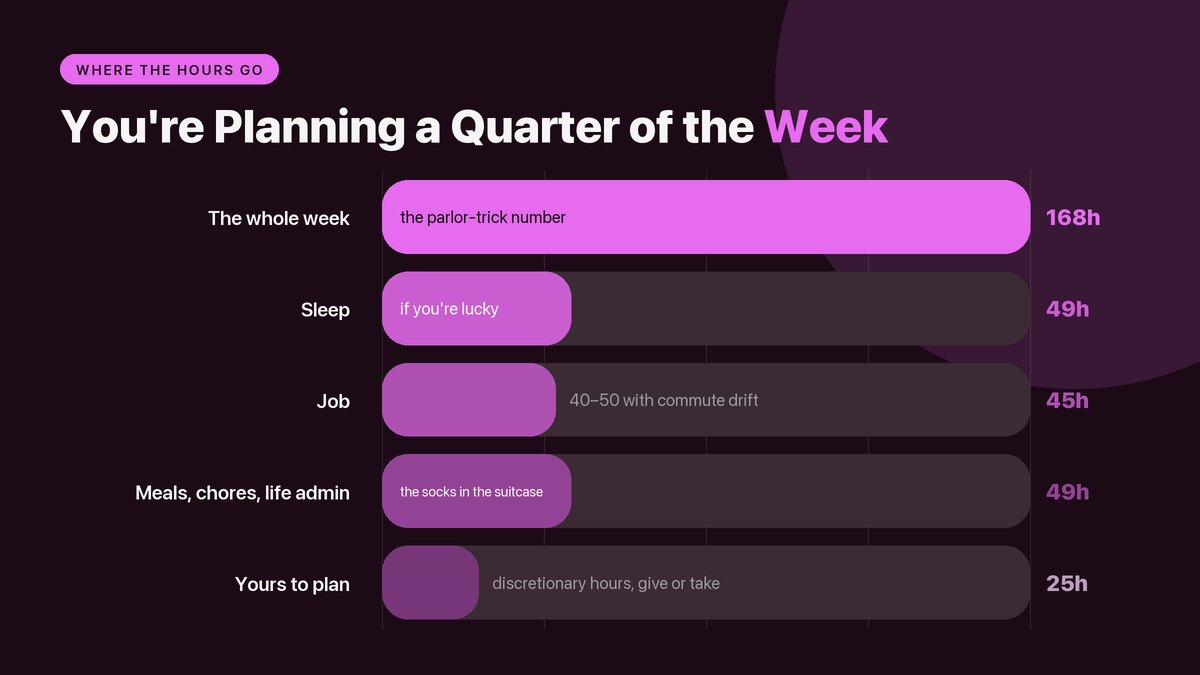
The real arithmetic starts with 168 hours, a figure that’s something of a parlor trick, since no one’s week is interchangeable. Take away about 49 for sleep, if you’re lucky, plus 40 to 50 for a standard job, and you land in that twenty-to-thirty-hour pocket of discretionary time from earlier. Twenty-five hours, more or less, is what you’re actually planning. A quarter of the week. Often less.
One more filter before the tiers, because hours and energy are not the same currency. An hour at 7:30 on a Tuesday morning, before anyone has asked you for anything, is worth more than an hour at 9 PM after a day of back-to-back meetings, and it isn’t close. Most people get two, maybe three real high-capacity blocks per week, and they hide in predictable places. Early morning for some, the first work hours for others, Saturday morning for the lucky few. Put big things in those blocks and small things in the leftover hours where half-attention suffices, because matching a task to an energy level beats matching it to an empty slot every single time.
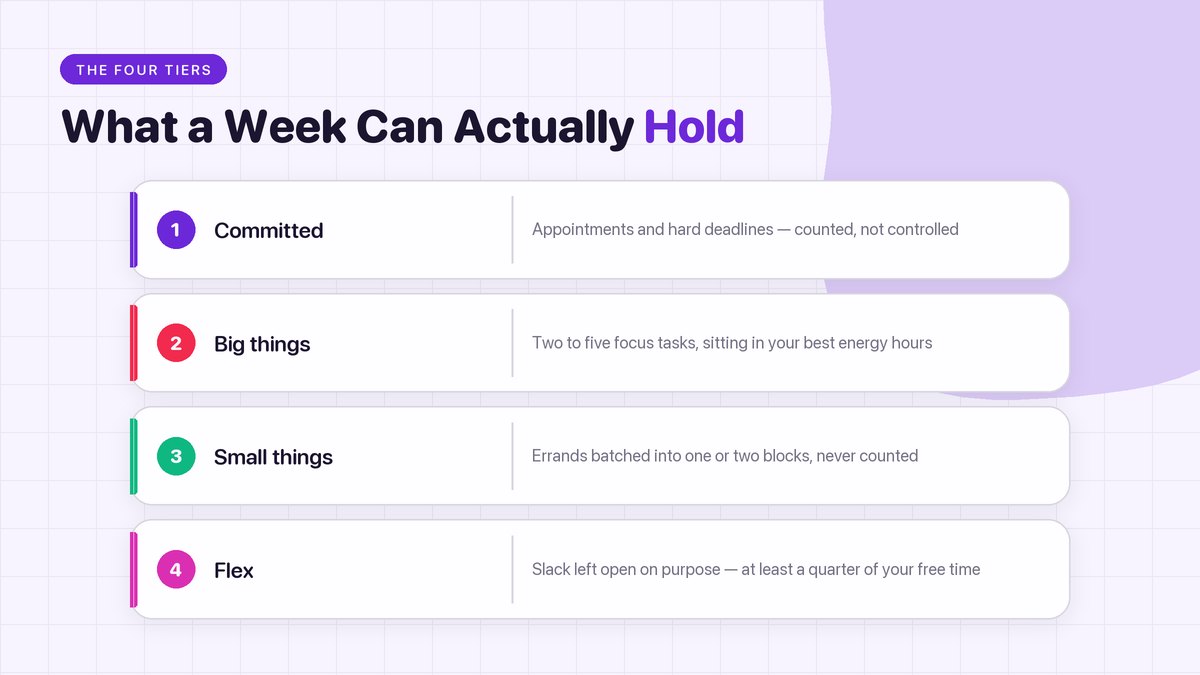
Now look at your big-things list with those twenty-five hours in mind, and apply the tiers:
| Tier | What it is | Realistic count per week |
|---|---|---|
| Committed | Appointments, deadlines, obligations you can’t move | Whatever’s on the calendar — count, don’t control |
| Big things | Tasks that take real focus: finishing a report, a long workout, a repair project | 2–5, and the low end on busy weeks |
| Small things | Errands, calls, emails, the ten-minute stuff | Batch them into one or two blocks, don’t count them |
| Flex | Unplanned hours left over on purpose | At least a quarter of your discretionary time, ideally more |
That last row, the flex row, is the one nobody wants to hear, because open hours look like waste on a plan and like genius by Wednesday, when the real week shows up. The flat tire. The sick kid. The project that swallows six extra hours. A plan allocated to 100% has no shock absorbers, so every surprise now steals from a promise you made yourself. Leave slack on purpose and the week bends instead of snapping. My old version ran at exactly 100% because it felt disciplined, which it was, in the way that tailgating at the speed limit is disciplined, every margin for error gone and the whole thing renamed a plan.
The Two-List Rule for Everything Else
So what happens to the tasks that missed the cut? This part matters, since a plan that deletes your real obligations is just a fantasy with timestamps. The tasks stay on the list, only now they’re sorted by honesty. I keep two short lists side by side. The first says Must happen and holds things with actual consequences if they slip: rent, the license renewal, the package that goes back before the return window closes. These get treated close to appointments and slotted early in the week, because late-week me has a documented flaking history. The second says Would be nice and holds the car wash, the photos folder, that one guitar riff finally learned properly. They get no slots at all, at least none that the calendar knows about.
They exist as a menu for stolen moments instead: the unexpected free hour, the evening where the plan finished early and energy remains. The mental shift is that nice-to-have items carry no commitment, which sounds like hair-splitting and isn’t. When everything on the list is a commitment, ending the day with three unchecked items feels like failure, and that feeling is exactly what makes people quit planning for good. When most of the list is openly optional, one nice-to-have checked off feels like found money, and it’s the same week with the same work but a different emotional ledger.
Anyone who’s run both kinds of list knows which one survives past February.
The plan isn’t there to make you do more. It’s there to decide what enough looks like before the week starts asking.
When the Week Falls Apart
It will fall apart eventually, not every week but often enough that a planning system with no failure mode is just decoration. The kid gets sent home from school. A work emergency eats Wednesday and Thursday both. Four broken hours of sleep on Tuesday turns Wednesday’s ambitious morning into Wednesday’s survival morning.
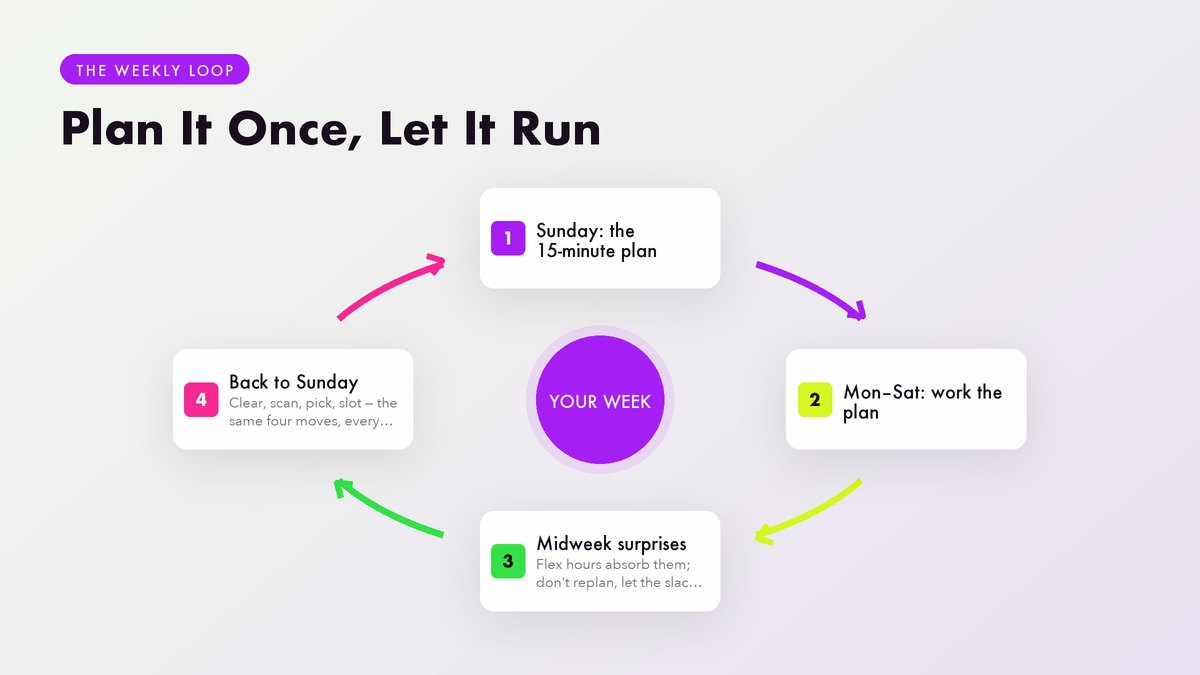
The fifteen-minute version handles this better than the forty-minute one, for a plain reason, which is that it has fewer moving pieces. A hyper-detailed plan breaking works like a delayed flight, where everything downstream is now wrong and untangling it costs more than the plan was worth. A plan of three big things with loose morning-and-afternoon labels loses maybe one of them to a lost day. You usually move it or you drop it, and the week shrinks gracefully instead of shattering.
My rule for broken weeks is simple: don’t replan midweek. Midweek you is irritated and short-sighted, and midweek replanning has a way of becoming “scrap it all and design a brand-new system on Friday,” which is procrastination wearing a productivity costume. Let the broken week stay broken, do the must-happen items, and run the normal session when Sunday arrives. The system resets itself, which is the entire argument for having a system rather than a chain of heroic efforts.
And keep one small promise to yourself in a bad week, which is the single smallest must-happen item, actually done. It sounds silly, but it keeps the streak with yourself alive, and that streak is what makes you trust the plan enough to keep writing one.
One mercy worth building in: never reschedule a big thing more than twice. The first reschedule is just life happening, a flat tire or a fever or a deadline moved up a day, and it says nothing about you. The second tends to mean the thing doesn’t fit this season, either because it’s too big or because it’s something you feel you should want rather than something you do. A third attempt changes nothing, at least nothing I’ve ever seen. Demote it to the nice list or drop it, let the week breathe, and remember that carried tasks collect interest, which is always paid in guilt.
What Changes After a Month of This
The first two weeks feel mechanical, and they should. You’re learning the shape of your actual week, which probably differs from the one you assumed. Maybe Thursday evenings are always a write-off and you never noticed. Maybe weekends hold more commitments than weekdays do. Around week three or four the plan starts describing reality instead of fantasy, and that’s when it gets powerful in the unglamorous way that actually lasts.
What I noticed, and what I’d expect you to notice, is that the small-things list shrinks on its own. Once errands and chores get batched into one or two blocks instead of smeared across every day, a surprising share of them prove to be unnecessary, or five-minute jobs that were sitting around looking large. Decision fatigue drops too, at least in my experience, since the question of what to work on gets answered once a week instead of eleven times a day.
By week four the timer becomes redundant, because the session just is fifteen minutes by then, the way brushing your teeth is two. You stop measuring it, and stretching it longer buys nothing. That’s my strongest signal a system has actually stuck, when I stop performing it and just do it.
Then an odd effect shows up. You start declining invitations inside the planning session itself. “Should I agree to that Thursday thing?” gets answered while you’re looking at the whole week, with the real cost visible, instead of while staring at one empty Thursday slot in isolation. In practice, the plan becomes a reason, and having a reason is much easier than becoming a person who says no.
If your mornings also tend to go sideways, this pairs well with a gentler start to the day, and the ideas in morning routines that don’t require waking up at 5 AM fit right alongside it. For keeping the small stuff out of your big-thing hours, the 2-minute rule is the oldest trick in my toolbox that still earns its keep. Fifteen minutes a week, one calendar, two lists, three to five big things, and a chunk of slack guarded like it matters, because it does. The fancy system never saved anybody I know, and the short honest one saves me every week.
Tools mentioned: Google Calendar (support.google.com), Outlook (support.microsoft.com), Apple Calendar (support.apple.com), Todoist (todoist.com/help and todoist.com/productivity-methods), Notion (notion.com/help). Internal links point to other articles on this site. This article covers personal organization only, and nothing in it is professional advice of any kind.